
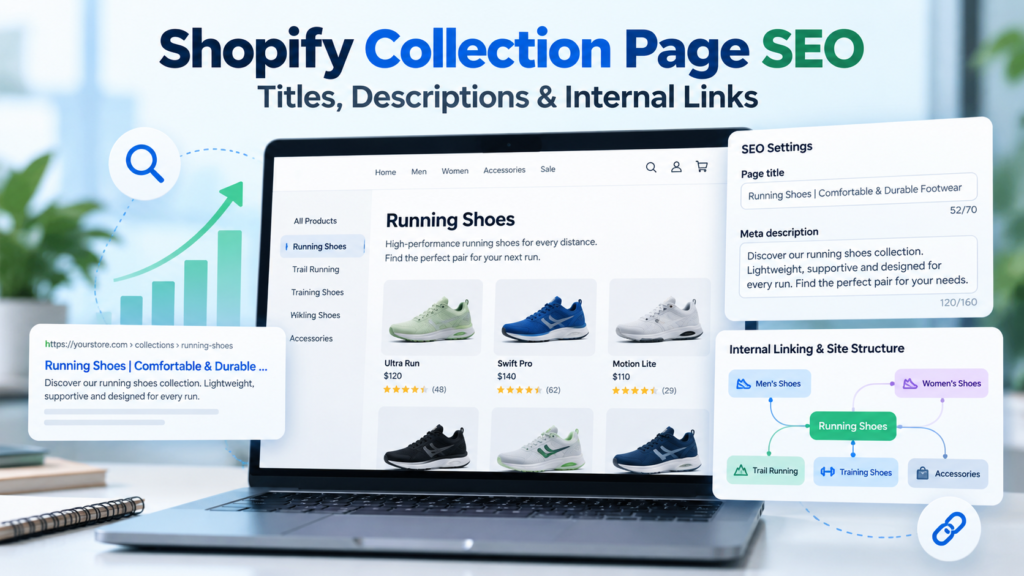
Shopify collection page SEO is about helping shoppers find a relevant product category—and helping search engines understand why that category deserves to appear for a specific shopping query. Three of the most useful levers are unique page titles, genuinely helpful collection descriptions, and a deliberate internal linking structure.
This guide shows how to optimize each element in Shopify in 2026, with copy-and-adapt templates, a practical navigation example, common mistakes, and a measurement checklist. It focuses on improving an already accessible collection page; if yours is missing from Google altogether, start with our Shopify collection indexing troubleshooting guide first.
What is collection page SEO?
A Shopify collection groups products—such as running shoes, ceramic mugs, or ergonomic office chairs—into one browsable category. The collection page can match searches where people want to compare multiple products rather than read an informational article or visit one product detail page.
Optimizing that page means aligning its title, visible heading, introduction, merchandise, navigation links and technical signals with a specific shopper need. Google evaluates more than exact keywords, so stronger copy is not a substitute for relevant inventory, crawlable links and a good experience.
Quick-start collection SEO checklist
| Element | Good starting point | What to avoid |
|---|---|---|
| SEO page title | Distinct category + useful qualifier + optional brand | Repeated or vague boilerplate |
| Meta description | Clear shopping proposition matching the inventory | Keyword repetition or unsupported promises |
| Visible H1 | Natural name matching the collection intent | Several competing primary headings |
| Above-grid introduction | Short category-specific explanation | Large generic SEO wall of text |
| Below-grid buying advice | Decision-making details customers need | Copied manufacturer or AI filler copy |
| Internal links | Menu → parent category → subcategory → product | JavaScript-only or orphaned links |
| URLs and canonicals | Stable, consistent preferred collection address | Unnecessary handle changes |
1. Choose one primary intent for each collection
Before editing title tags, decide exactly what the collection is supposed to help shoppers buy. A query like waterproof trail running shoes usually expresses shopping intent. A query like how to clean trail running shoes is informational and usually belongs in a supporting guide, which can link back to the collection.
Compare the products in the collection with the top search results for the intended query. If the assortment includes only a few waterproof models among dozens of casual sneakers, the category promise may be misleading. Consider a focused subcollection when the assortment genuinely supports it.
Use one primary category phrase, plus natural variants that accurately describe the products. Do not create five overlapping collections for five almost-identical keywords merely to multiply indexed URLs.
2. Write Shopify collection SEO titles that earn the click
The HTML <title> element helps search engines and customers understand a page. A good title identifies the product category, provides a useful qualifier if warranted, and distinguishes the collection from neighboring categories.
Practical title formulas
- [Specific category] | [Key differentiator] – [Brand]
Example: Waterproof Trail Running Shoes | Men’s & Women’s – Northpath - [Category] for [audience or use] – [Brand]
Example: Ergonomic Desk Chairs for Home Offices – Alder & Co. - [Material] [product type] | [Main use case]
Example: Stoneware Coffee Mugs | Everyday Ceramic Drinkware
These are templates, not mandatory formats. Only mention free shipping, discounts, guarantees or specific product features when the collection actually supports those claims.
Before: Running Shoes – Shoes – Sneakers – Shop Shoes
After: Women’s Trail Running Shoes | Grip & Comfort – Northpath
Google does not impose a universal character-count ranking rule. Titles can be truncated in different layouts, and Google may generate a different title link based on headings, prominent text and other page signals. Put the meaningful words early, keep wording concise, and avoid stuffing. See Google’s title-link recommendations.
3. Write meta descriptions for shoppers—not algorithms
The meta description is your opportunity to propose a compelling summary of the category. It is not a direct guarantee of rankings, and Google may select other on-page text when it thinks that text better matches a search.
A useful formula is: what the shopper can browse + important distinguishing details + honest next step.
Example: Explore women’s trail running shoes for rocky routes and wet conditions. Compare traction, fit and cushioning to find the right pair for your next run.
That description is more useful than: Best shoes, trail shoes, running shoes, cheap running shoes, buy shoes online. Keep descriptions unique across major collections and ensure they remain accurate as products change. A readable 140–160-character draft can be a useful starting point, but it is not a Google requirement and snippets vary by device and query.
If an advertised collection contains no in-stock waterproof footwear, remove the waterproof promise or improve the product assortment. Relevance matters more than persuasive language.
4. Edit a collection’s title and meta description in Shopify
- Sign in to the Shopify admin and go to Products → Collections.
- Open the collection you want to optimize.
- Find Search engine listing and select its edit control. Shopify’s admin labels can change over time.
- Enter the page title in Page title.
- Enter your copy in Meta description.
- Check the URL handle, but do not change an established collection address merely to add another keyword.
- Save, visit the public page, and verify that the page title and rendered description reflect your update.
When a URL handle truly must change, choose Shopify’s redirect option and test the old URL. Avoid unnecessary URL edits, which can disrupt links and search signals. The official Shopify collection settings documentation explains these fields.
5. Optimize the visible collection heading (H1)
A concise visible heading should clearly label what visitors are shopping for. Your SEO title and H1 do not have to match word for word, but they should describe the same category. For instance, a page title could be Waterproof Hiking Boots for Women – Northpath while the visible H1 simply reads Women’s Waterproof Hiking Boots.
Check your theme’s generated HTML. Some themes use the collection title as the H1 and display an additional rich-text heading above it. If that creates confusing duplicate primary headings, simplify the layout rather than hiding important content from shoppers. Use H2s for subordinate topics such as sizing, materials and common questions.
6. Create a useful above-the-grid introduction
The first paragraph should confirm visitors have arrived in the right place without delaying the product grid. Usually a short introduction does the job: what the collection contains, for whom, and which important choices customers can make.
Example introduction: Find trail running shoes built for uneven paths, loose gravel and changing weather. Browse road-to-trail and technical styles, compare grip and cushioning, and choose a fit that suits your terrain.
Use language a real buyer understands. Do not list every possible synonym of your target keyword. If you need to explain six buying criteria, put a brief introduction near the top and detailed advice lower down where it will not overwhelm the products.
7. Add genuinely valuable buying guidance below the product grid
Category-specific buying advice can differentiate a collection from nearly identical retailer pages. The right content depends on the products:
- Running shoes: terrain, cushioning, fit, tread depth, waterproofing limitations.
- Office chairs: seat-height range, lumbar support, adjustments, materials, desk compatibility.
- Ceramic mugs: capacity, glaze variations, dishwasher guidance, handling and care.
Write with the actual catalog open. Link to helpful size guides, shipping information and product details where relevant. Keep claims verifiable; avoid unsupported assertions about health, safety or product performance. An original 100-word explanation that answers a real buying question can be more useful than 800 words of repetition.
8. Build a collection hierarchy Google can follow
Internal links connect the homepage, broad categories, specialized collections and individual product pages. Google explicitly recommends making important ecommerce content reachable through links, rather than relying only on an internal search box.
Example store structure:
Home
└── Footwear
    ├── Running Shoes
    │   ├── Trail Running Shoes
    │   └── Road Running Shoes
    └── Hiking Boots
        └── Women's Waterproof Hiking Boots
            ├── Product A
            └── Product B
On a real Shopify store, this hierarchy can be represented through menu items and contextual links; it does not require a physically nested collection URL. Shopify collection URLs normally use the /collections/ path, so the relationships are conveyed largely by links and navigation.
To make this hierarchy useful, link from prominent menus to key parent collections, from a parent category to its useful subcategories, and from each collection to its actual products. Where appropriate, related buying guides can link to the relevant collection. See Google’s ecommerce site-structure guide.
9. Use descriptive internal-link anchor text
Anchor text tells both users and search engines what to expect after clicking. Compare:
- Less useful: Click here for more.
- More useful: Explore women’s waterproof hiking boots.
Do not force identical keyword-rich anchors onto every page. Links should appear naturally in navigation, relevant category introductions, guides or contextual recommendation sections. Avoid adding a large block of unrelated category links just for SEO.
For an ecommerce navigation link to be reliably crawlable, use a real HTML <a href="..."> link. A clickable <div> without a proper link may not provide the same discoverability. Google also recommends linking to all products you want discovered, with pagination or other crawlable navigation for larger grids.
10. Prevent orphan collections and cannibalization
A collection may be technically indexable yet receive almost no meaningful internal links. That is an orphan or weakly linked collection. Audit important categories by starting at your home page and attempting to reach them through ordinary links. A sitemap can help discovery, but it does not replace a coherent navigation structure.
Also check whether multiple collections compete for the same intent. Two pages called Waterproof Trail Shoes and Waterproof Running Shoes, each with almost identical inventory, may confuse your category strategy. Consolidating can help when the shopper intent and assortment are truly the same; keeping both can make sense when they clearly serve different needs.
Before merging a category, check traffic, backlinks, conversion data and the effect on shoppers. Do not redirect useful, distinct collections without evidence.
11. Keep collection URLs and canonical signals consistent
Use stable, readable collection handles, such as /collections/womens-hiking-boots. Make sure internal links consistently point at the intended collection URL. Filter and sort parameters often create URL variations; their crawling and canonical handling should fit your theme and search strategy.
For details about Google-selected canonicals, indexability and duplicate URLs, see our 11 fixes for Shopify collection pages not ranking. If your broader store needs an audit, use our 35-step Shopify SEO checklist.
Do not casually canonicalize all paginated pages to page one if those URLs represent different sets of products. Google’s ecommerce URL structure guidance recommends clear, consistent URLs.
12. Track whether optimization is working
Open Google Search Console → Performance → Search results, filter by the exact collection URL, and review:
- Impressions: are more relevant queries surfacing the page?
- Clicks and CTR: are shoppers selecting your result?
- Queries: does the search language fit the collection?
- Average position: is visibility improving across comparable periods?
Record the implementation date and give Google time to revisit the page. Compare reasonable date ranges and remember that seasonality, inventory and competitors also affect results. Rankings are not guaranteed by any title rewrite or link change.
30-minute Shopify collection SEO workflow
| Time | Action | Output |
|---|---|---|
| 0–5 min | Confirm the main search intent and product assortment | One focused category target |
| 5–10 min | Rewrite SEO title and meta description | Distinct, accurate search listing |
| 10–15 min | Improve H1 and above-grid introduction | Clear page purpose |
| 15–22 min | Add buyer questions, product-specific details and helpful guidance | Useful collection content |
| 22–27 min | Check menu links, subcategory links and product links | Crawlable category paths |
| 27–30 min | Inspect the public URL and annotate Search Console monitoring | Baseline for later evaluation |
Frequently asked questions
Should Shopify collection titles include the store name?
Include a concise brand name when it helps users recognize the retailer and does not obscure the category. For long, specific categories, prioritize the important product terms. Google may choose a different title link depending on the query and page signals.
How long should a Shopify collection description be?
There is no required word count. An effective page usually combines a brief introduction with enough original buying guidance to help people make a decision. Write as much as the category genuinely needs, not as much as a generic SEO template demands.
Do meta descriptions directly improve Google rankings?
Google does not use a meta-description keyword count as a direct ranking shortcut. Useful descriptions may influence how people understand a result, but Google can generate snippets from visible page content instead.
Can I add internal links inside Shopify collection descriptions?
Yes, when the collection description editor and theme support links. Link to related collections, relevant guides or sizing resources only when they genuinely help the shopper. Confirm links appear in the published theme and have working href destinations.
Should every filtered collection have its own SEO title?
Not necessarily. Most sorting and filtering combinations do not deserve separate indexable landing pages. Create distinct, optimized pages only for meaningful assortments with identifiable shopper demand and enough unique value.
Will changing the Shopify collection handle improve SEO?
Not automatically. A descriptive URL can help usability and clarity, but changing established URLs creates redirect and maintenance work. Keep existing URLs stable unless there is a clear reason to change them, and verify redirects if you do.
Final takeaways
Strong Shopify collection page SEO begins with an honest match between a shopper’s query and the products on the page. Give every important collection a distinctive title, a clear meta description, helpful on-page copy and crawlable links from relevant categories and guides. Monitor outcomes rather than assuming keywords or a certain word count will guarantee rankings.
Official resources: Shopify: Managing collection settings; Google: Title links; Google: Ecommerce navigation structure; Google: Ecommerce URL structure.